# Introduction

Glide Finance is a **Decentralized Exchange / Automated Market Maker, Yield Farming, and Staking platform running on the Elastos Smart Chain (ESC)** that aims to accelerate adoption of the Elastos ecosystem by acting as a source of liquidity for users and the projects built on it.
We're invested in building a strong foundation with our GLIDE token as a **governance token**, **diverse farms**, a built in bridge, and more features down the line.
## Main Features
#### **↔️ Trade**
The exchange is a set of smart contracts based on Uniswap V2 that allows any combination of two tokens to be swapped.
#### :ocean: **Supply Liquidity**
Deposit your assets into liquidity pools to earn trade fees and support the growth of the Elastos ecosystem.
**💸 Farm**
Earn GLIDE tokens for liquidity mining and staking, or earn other tokens by supplying GLIDE to special partnership[ ](https://apeswap.finance/pools)pools with other projects building on Elastos.
## 🤔 Why Elastos?
Elastos is a multi-chain ecosystem, which provides **secure, fast transactions with extremely low transaction fees**. The Elastos Smart Chain is one of many components included in the Elastos SmartWeb, **a fully decentralized internet where users are the owners of their own identity and data.**
We have chosen to build as early-movers on Elastos to support the growth of the ecosystem, and include novel features that merge decentralized finance (DeFi) technology with decentralized identifiers (DIDs).
# Launch Details
Fair launch. No pre-sale. No pre-mine.

### Website Re-Launch
The website at will be upgraded on **Monday, November 1st at approximately 6 PM UTC.** At this stage, users will be able to bridge funds from Ethereum and Heco to ESC, provide liquidity, and stake their LP tokens in farms.
{% hint style="info" %}
Before farming begins, you can deposit your tokens to any farms or pools, but there will be no rewards until the start block.
{% endhint %}
**There is no rush!** We want everyone who wishes to participate at start of $GLIDE farming to be able to do so and not miss out because they were busy at a specific time. **There will be** **2 days between the website launch and the first block to produce $GLIDE.** See the [farms details section](/products/farm-details) for the liquidity pairs available at launch and the [bridge section](/products/bridge) for instructions on how to move assets to ESC.
{% content-ref url="/pages/-MlC3AJf11F3e2sQk1xs" %}
[Farm Details](/products/farm-details)
{% endcontent-ref %}
{% content-ref url="/pages/-Mb8kYm5szh9\_lznvpsj" %}
[Bridge](/products/bridge)
{% endcontent-ref %}
### Farming Start
* Farming Start Block: #9255555
* Estimated Time: 18:00 UTC on November 3rd
**A countdown will be provided on the website for users to monitor for the start of farming.**
{% hint style="info" %}
The dev team will mint 1 $GLIDE to create the liquidity pools. **There will be near-zero liquidity for $GLIDE before farming begins! Do not attempt to buy any!**
{% endhint %}
{% hint style="danger" %}
The first days and hours for a zero pre-mine DEX token are highly volatile! **We advise against buying the $GLIDE token while the supply remains low** as the price can be easily manipulated.
{% endhint %}
# Roadmap
A roadmap for Glide Finance. These objectives are not definite and may change.
### Phase I: Initial Launch 🚀
This phase is all about getting the first working DEX in front of users on the Elastos Smart Chain (ESC). At this stage we will not be bringing anything especially new to DeFi, but rather adapting well-tested and secure smart contract logic for use on ESC as a foundational tool.
* [x] Design token economics
* [x] Work with Elastos cores teams on required infrastructure upgrades
* [x] Bridge support and fee subsidies
* [x] Essentials integration
* [x] Block explorer bug fixes
* [x] Design AMM
* [x] Create LP farms and staking structure
* [x] Audit
* [x] Emphasis on UI/UX
* [x] Clean interface
* [x] Solid branding
* [x] Desktop and mobile responsiveness
* [x] Built in cross-chain bridging
* [x] Gas faucet for first time ESC users
* [x] Seek support from CR to provide a base of liquidity
* [x] Release Glide supernode to boost staking rewards
We would like to thank the Elastos Foundation for the financial support they provided to help make this a reality.
### Phase II: Foundational Work 🛠
Once we have this foundation established we can set our focus toward building the future of Glide and expanding activity on ESC.
* [x] Analytics page
* [x] Glide RPC node
* [ ] Alternative hosting for frontend (IPFS backup or otherwise)
* [ ] Explore partnerships with cross-chain liquidity protocols to add support for Elastos and expand our list of bridgeable networks
* [x] Work with other Elastos teams to support new tokens
* [x] Ecosystem NFT holder incentives (if applicable)
* [x] Partnership token rewards (if applicable)
* [x] Decentralized Autonomous Organization (DAO)
* [x] Protocol voting
* [ ] Limit orders
* [ ] Tradingview charts
* [ ] Portfolio tracker
### Phase III: Exploratory Features :sunrise\_over\_mountains:
* [x] NFT integration with DeFi
* [ ] Liquid Staking for ELA
* [ ] Bond sales to generate protocol controlled liquidity
* [ ] Dual asset farms
* [ ] More efficient swapping algorithms for correlated assets
* [ ] DID credentialing incentives
* [ ] Explore long-term burning mechanisms for $GLIDE
# Wallets
To use Glide, you will need either need Elastos Essentials ([**download here**](https://elastos.academy/elastos-essentials-wallet-for-beginners/)), a MetaMask wallet connected to the Elastos Smart Chain, or a multi-chain wallet that supports adding custom networks (such as TokenPocket).
**Elastos Essentials (pictured below) is the ecosystem's mobile super wallet** and includes important features such as decentralized identifier (DIDs) support and cross-chain functions, which are used to move ELA from the Elastos mainchain to the Elastos Smart Chain. **We recommend Essentials for users who wish to interact with Glide on their mobile devices.**
**For desktop users or users experienced with decentralized finance applications, MetaMask is recommended.** MetaMask by default only supports the Ethereum network. However, when you connect MetaMask to Glide, it will automatically configure MetaMask to work with the Elastos Smart Chain. To add manually, use the follow network settings:
* Network Name: Elastos
* RPC URL:
* ChainID: 20
* Symbol: ELA
* Explorer URL: [https://esc.elastos.io](https://esc.elastos.io/)
You can also click to add it on (labeled as ELA-ETH Sidechain).
To perform transactions on Glide or any other Elastos dApps, you will need ELA for gas. See [here](/getting-started/esc) for the guide on how to get gas.

# Swap
Glide Finance AMM (Automated Market Maker)
Token swaps on Glide (based on Uniswap V2) are a simple way to trade one token for another via automated liquidity pools. Deviations between the trading price of assets on Glide and external sources such as centralized exchanges create arbitrage opportunities for traders and allow the price of assets to track market-wide averages.
### Trading Fee
When you swap (trade) on the exchange, you will pay a 0.25% trading fee, of which 0.05% is returned to liquidity pools as a reward for liquidity providers and 0.2% is converted into ELA and shared with GLIDE holders through the [Dividend Pool](/products/pools#3-dividend-pool). None of this fee will go to a treasury or developer fund.
## **How to Swap**
**Requirements**
* Connected wallet (MetaMask, Elastos Essentials, or other with custom network support)
* Some (less than 1 cent) ELA for gas
**Steps**
1. First connect to Elastos with your MetaMask wallet by clicking the Connect Wallet button on the top left. MetaMask will ask your permission to switch networks.
2. Go to "Swap"
3. Choose the token you want to swap from by clicking on the "From" token, a window will pop up to select the token with your balances
4. If the token you're looking for is not in our default list, you can add it by entering its address in the search box, and an option to add it to the list will appear
5. Once you have selected your "From" token, select your "To" token the same way
6. If you haven't approved the tokens yet, you will be prompted to approve them. Click on the "Approve" button, and your wallet will ask you to confirm the approval. This may take a few seconds in the network to approve.
7. Once "Swap" appears enabled, you can click swap, your wallet will ask you for your permission.
8. You will see the "Transaction Submitted" screen when your request to swap has been added to the chain's mempool. To check on the progress, you can click on "View on explorer", or view the activity link in your wallet.
You have now completed your first swap on Glide!

# Liquidity
## Overview
Adding liquidity allows the contributor to earn 0.05% swapping fees from the pairs they've provided. You can supply liquidity and start earning fees via [adding liquidity here](https://glidefinance.io/add). Your liquidity can earn even more rewards (GLIDEs) if they're staked at farms!\
\
When you've provided liquidity, you will receive Glide-LP tokens (Glide Liquidity Provider tokens) as proof of contribution. For example, if a user deposited $GLIDE and $ELA into a pool they would receive GLIDE-ELA LP tokens. These tokens represent a proportional share of the pooled assets.\
\
These LP tokens can be staked at farms to earn GLIDE. We have 6 pairs for you to stake to begin, and plan to expand the list over time as more assets are made available on ESC.
### How a pool accrues value from fees
If at the time of a trade, there are 100 Glide-LP tokens representing 100 ELA and 100 GLIDE, each LP token would be worth 1 ELA and 1 GLIDE. \
\
If one user trades 10 ELA for 10 GLIDE, and another traded 10 GLIDE for 10 ELA, then there would now be 100.005 GLIDE and 100.005 ELA in the pool.\
\
This means each LP token would be worth 1.00005 GLIDE and 1.00005 ELA when it is withdrawn.
### Adding liquidity to an existing pool
You need to provide tokens in a 1:1 value ratio to the liquidity pool. This means that if you are adding to, say, a GLIDE-ELA pool, and wish to provide 1000 ELA worth of liquidity, you would need to convert approx 500 ELA to an equal value of GLIDE tokens first using the swap tool.
### Adding liquidity to a new pool
If the pool you wish to provide liquidity to does not exist, you can create it yourself. Just provide the tokens and off you go. As the first liquidity provider, you set the initial exchange ratio (price) if one of the tokens in the pair does not exist yet on Glide. This often quickly corrects itself through arbitrage and by more liquidity providers adding to the pool.
## Impermanent Loss
Impermanent Loss (know as IL) is one of the risks you take on for being a liquidity provider and is a result of how AMMs function. Here are two articles to better explain it:\
\
[Understanding Uniswap Returns](https://pintail.medium.com/understanding-uniswap-returns-cc593f3499ef)\
[Beginners Guide to Getting Rekt by Impermanent Loss](https://blog.bancor.network/beginners-guide-to-getting-rekt-by-impermanent-loss-7c9510cb2f22)
They will give you an idea of what IL is and how you are affected by it.
TL;DR: Large swings in the relative price difference of the two tokens in the pool could result in a loss compared to holding the tokens themselves if you withdraw at that precise moment (hence the term impermanent). The loss is only "permanent" if you withdraw your liquidity completely, however that does not mean the IL will necessarily go away over time. Generally speaking, the trading fees received for being a liquidity provider and the yield from the farm can offset IL risk, but nothing is guaranteed.
# Liquidity Farming
Earn $GLIDE while staking LP tokens
The farm is the place to stake your Glide-LP (Glide Liquidity Pair tokens) to earn GLIDE. These farms provide incentives to people providing liquidity to Glide and help offset impermanent loss risk.
### Farms at Launch
In order to ensure liquidity depth is sufficient, we support a limited set of assets from the supported bridge networks. Eventually the pairs that receive GLIDE incentives will be decided by community governance and will slant heavily in favor of high-demand assets that generate the most fees for the protocol.
See [Farm Details](/products/farm-details) for the allocation to each pair.
{% content-ref url="/pages/-MlC3AJf11F3e2sQk1xs" %}
[Farm Details](/products/farm-details)
{% endcontent-ref %}
Have these tokens on another chain? You can bridge them to ESC using Glide by following [this guide](/products/bridge).
{% content-ref url="/pages/-Mb8kYm5szh9\_lznvpsj" %}
[Bridge](/products/bridge)
{% endcontent-ref %}
###
### **How to Stake Liquidity**
If you have provided liquidity to a liquidity pool that is available for rewards (if not, please see Farms at launch section), then now is the time to earn some GLIDE! It is really easy to do.
1. **First find the pair** you wish to farm, and make the Glide-LP for that pair on the liquidity page.
2. If this is your first time staking in this pool on Glide, you will need an approval from your wallet to begin the process. Click on "**Enable**". This will prompt a transaction to approve our smart contracts handling your Glide-LP tokens for that specific pool.
3. Once that is done, click on the "**+**" icon.
4. You will be shown a modal where you can specify how many of your Glide-LP tokens you wish to stake
5. Once you've decided, clicking "**Confirm**" will then prompt you with the transaction necessary to stake the tokens in our smart contracts. \
\
That's it! Now all you have to do is sit back and relax while you earn GLIDE.
###
### **Liquidity Farm FAQ**
**Will there be any fees for staking/depositing?**\
No, staking here is fee-free.
**Are the APRs for real?!**\
Yes, but as more liquidity joins the pool, expect the APRs to go down naturally as your share of the pool decreases.
**What will I be earning?**\
By staking your liquidity token in a farm, you are:\
\
1\. Collecting swapping fees whenever someone swaps between the pair you've provided. The amount of your Glide-LP tokens will not increase, but the value they represent will. \
2\. Earning GLIDE based on the farm weight. Because of how the Glide DEX fee structure is arranged, this will make up the majority of your income.\
\
**I can't find my pair, where is it hiding?**\
There may be a couple of reason why your pair is not showing up:\
\
1\. Check your wallet is connected, and to the Elastos network\
2\. If you've provided LP in a farm that's been deprecated, the pair will show up in the "Inactive" tab that you can switch to by clicking on the tab on the top left. Once you're on the Inactive farms page, you'll need to connect your wallet again to see if your pairs are there.\
3\. Your LP contract may still be confirming, you can check on the [ESC explorer](https://esc.elastos.io) for the status\
4\. If your LP is staked in a farm, it will not show up in the "Liquidity" tab on the Swap page
# Farm Details
Relative GLIDE distribution allocated to each liquidity pair
### Farm Weights
| **Token Pair** | **Weight** |
| -------------- | ---------- |
| GLIDE-ELA | 12x |
| GLIDE-USDC | 6x |
| USDC-ELA | 22x |
| ETH-ELA | 10x |
| HUSD-USDC | 3x |
| BUSD-USDC | 6x |
| stELA-ELA | 6x |
###
### Where do these tokens come from?
| **Token** | **Origin Network** |
| --------- | ------------------- |
| GLIDE | Elastos Smart Chain |
| stELA | Elastos Smart Chain |
| ELA | Elastos Mainchain |
| ETH | Ethereum |
| USDC | Ethereum |
| HUSD | Heco |
| BUSD | Binance Smart Chain |
# Single Stake Pools
Stake your GLIDE and earn rewards!
**Glide's Pools are one of the easiest ways to start earning rewards:**
* Stake.
* Profit.
* Repeat!
No messing about with impermanent loss, selling half the rewards or pairing. At launch there will be **three core staking options:**
### 1. Manual GLIDE
Manual GLIDE is your typical staking pool. Users are given the option to harvest or compound their earned GLIDE themselves.
### 2. Auto GLIDE
Auto GLIDE is a automatic compounding vault for GLIDE staking. This gives users the option to set and forget. Simple stake your GLIDE and know that is automatically being compounded for you. Note that this pool has some additional parameters:
* There is a 1% fee applied if the user decides to unstake their GLIDE before 7 days have passed. After 7 days, there is no unstaking fee
* The 7 day timer will reset every time you stake fresh GLIDE in the vault
* There is a 2% performance fee applied that will be sent to a treasury and then burnt
* There is a bounty reward available for users to assist in compounding the pool. They will receive 0.25% of the pending GLIDE yield for activating the function
### 3. Dividend Pool
This is a special pool that is funded by several mechanisms:
1. Every trade made on the Glide DEX is subject to a 0.25% trade fee, **0.2% of which is converted to ELA** and deposited into this pool.
2. The **Glide supernode** will deposit 100% of its income here. Vote for Glide on the mainchain for more ELA rewards on the Glide DEX!
3. Future partnership programs and incentives are planned to inject more ELA into this pool.
Note that the ELA distribution rate of this pool may change frequently due to variations in the amount of ELA available to return to Glide platform users.

### The Sugar Token
You may have noticed when you stake your GLIDE in the Manual or Auto GLIDE pools, you will receive a 'Sugar' token (because our mascot is a sugar glider of course!). This token is used for record keeping of your staked position. **Do not transfer, sell, or burn this token. You will need it to redeem your GLIDE.**
# Liquid Staking
Please refer to the article originally posted on Medium for program details . This documentation section will be updated soon.
**Audit results** for the stELA liquid staking system can be found [here](https://paladinsec.co/projects/glide-finance/) along with the official contract deployments.
# Bridge
How to Bridge
In order to provide liquidity to non-native ESC farms, you'll need to swap for or move assets to ESC from other chains first. This process is called bridging.
Glide's bridge uses the same underlying contracts as [Shadowtokens](https://tokbridge.net). It currently supports moving a limited set of assets from Ethereum, Binance Smart Chain (BSC) or Heco to ESC, and from ESC to Ethereum, BSC or Heco. The bridge will only list assets that are support by the Glide DEX.\
\
**ETH - ESC** bridge supported tokens:
* ETH
* USDC
* ELA
* MTRL
**BSC - ESC** Bridge Supported Tokens:
* BNB
* BUSD
* ELA
* BTCB
**Heco - ESC** Bridge Supported Tokens:
* HT
* HUSD
* ELA
* FILDA
As the protocol grows alongside ESC, we'll be adding more tokens to the list to support!\
\
It's also worth noting that our partner [Elk Finance](https://elk.finance) provides bridging capability to ESC from over 14 other EVM networks. This makes moving assets to and from ESC much easier. Check out the Elk bridge resource section for more information.
{% content-ref url="/pages/xi0D4m8uqk8A8Pu9szZ6" %}
[ElkNet Bridge](/resources/elknet-bridge)
{% endcontent-ref %}
### Bridge Fees
The advantage of the bridge design is that the user only needs to submit one transaction on the origin chain and the bridge will automatically pay the gas fee on the destination chain. This is good for user experience, but has the disadvantage of necessitating some fee capture to cover gas expenses (especially for expensive chains such as Ethereum).
Fees are percentage based and vary based on chain. Minimum transfer limits are also imposed in many cases to improve gas efficiency and minimize costs. The table below details the minimum transfer limits and fees for the various supported tokens.
#### **Ethereum**
| Asset | Min Transfer | Fee to ESC | Fee from ESC |
| ----- | ------------ | ---------- | ------------ |
| ETH | 1 | 0% | 1% |
| USDC | 5,000 | 0% | 1% |
| ELA | 1,000 | 0% | 1% |
| MTRL | 100,000 | 0% | 2% |
#### **Binance Smart Chain (BSC)**
| Asset | Min Transfer | Fee to ESC | Fee from ESC |
| ----- | ------------ | ---------- | ------------ |
| BNB | 2 | 0% | 0.1% |
| BUSD | 1,000 | 0% | 0.1% |
| BTCB | 0.025 | 0% | 0.1% |
| ELA | 200 | 0% | 0.1% |
**Heco**
| Asset | Min Transfer | Fee to ESC | Fee from ESC |
| ----- | ------------ | ---------- | ------------ |
| HT | 0.1 | 0.1% | 0.1% |
| HUSD | 0.5 | 0% | 0% |
| ELA | 0.1 | 0.1% | 0.1% |
| FILDA | 0.5 | 0% | 0% |
### Faucet
There is also a faucet linked with the bridge, guaranteeing new ESC users will have gas to begin transacting. See the [faucet section](/products/faucet) for details.
{% content-ref url="/pages/-Ml6FYqykcAkWWcg92Hp" %}
[Faucet](/products/faucet)
{% endcontent-ref %}
## How to Bridge
### 1. Select Networks for Bridge Direction
First, select the networks you’d like to bridge to and from. **One of the networks must be Elastos** as the Glide bridge does not support bridging ETH -> Heco or Heco -> ETH.

### 2. Select Token to Bridge
In the "Select token to bridge" field, select a token that you’d like to bridge.

### 3. Enter the Amount
Check that the amount you've entered is within the minimum and maximum supported by the Shadowtokens contracts. Bridging tokens onto or off of ESC will not incur a fee! However, native assets (i.e. ETH, HT, ELA) will include a small fee (usually 0.1%).

### 4. Click "Enable"
For non-native assets (everything but ETH, HT, ELA), you will need to allow the bridge contract to spend your tokens. Click enable and then approve the transaction in Metamask.
### 5. Click “Bridge Token”
Metamask will ask you to confirm your action. Unlike many other bridges, there will only be 1 transaction for you to confirm from the origin chain. The destination chain transaction is handled internally by the bridge mediator. You will receive the same token you bridged.
The bridging process may take a few minutes to propagate. **The Glide interface will monitor for the bridging success for 3 minutes**, after which it will time out and alert the user to monitor the block explorer for their transaction. **If this happens to you, fear not!** Give it 10-20 minutes and if your tokens still do not show up on the destination chain, then check the [troubleshooting](/resources/troubleshooting) section or hop in our [Telegram](https://t.me/glide_finance) for assistance. **Do no worry, your funds are safe.**
### 6. View Your Bridged Token
To check if you've received the token on the other side of the bridge, **connect your wallet to ESC,** visit the [swap page](https://glidefinance.io/swap) and look to see if your token balance is updated. Alternatively, you can add the token address to Metamask (find them [here](/addresses/tokens)), or simply search your address in the block explorer at .
### 7. After Bridging to Elastos?
What now? If you were looking forward to trading some tokens or farming, just like any other chain, you will need some ELA for gas to perform transactions**.** Luckily you should already have some from the bridging process! If for whatever reason the faucet failed or ran out of funds, please drop a message in the [Telegram](https://t.me/glide_finance) and someone will help you out.
# Faucet
Gas is often a friction point for moving assets between various blockchains. To solve this problem, we implemented a simple gas faucet that triggers automatically when users move assets from other blockchains to ESC. Currently, the drip is set at 0.01 ELA, which is sufficient to submit dozens of transactions on ESC.
**There is currently no way to receive a faucet drip without first submitting a transfer request to the bridge.** This is how we mitigate against spam. The faucet service will receive the request, verify the transaction hash as a legitimate bridge transaction, and then release the drip to the user's address.
To verify that your transaction is eligible for a faucet drip, you should see this notification at the bottom of the bridge page. Once you've submitted the transaction, you'll receive a notification if the drip was successful.
That's it. If for some reason the faucet fails or runs out of funds, please drop a message in the [Telegram](https://t.me/glide_finance) group and someone will assist you.

# GLIDE Token
All things $GLIDE

### 💠 Token Information
* Token Symbol: GLIDE
* Contract Address: `0xd39eC832FF1CaaFAb2729c76dDeac967ABcA8F27`
* Chain: Elastos Smart Chain (ESC)
* Max Supply: 50,000,000
* Farming Genesis Block: #9255555
* No pre-mint or pre-mine. Completely fair launch
### :signal\_strength: **Distribution**
| **Distributed to** | **Allocation** | **GLIDE/block** | **GLIDE/day** |
| ------------------- | -------------- | --------------- | ------------- |
| Liquidity & Staking | 65% | 1.462 | 25,272 |
| Community Treasury | 22.5% | 0.506 | 8,748 |
| Development | 12.5% | 0.281 | 4,860 |

### ⛏️ Emission Rate
* Issuance will begin at 3 GLIDE/block (5 second block times) for a 3-month bonus period. When the bonus period ends, issuance will be cut by 25%
* After the bonus period, the token will adopt a deflationary model wherein $GLIDE issuance is cut by 15% every 6 months
* The 50,000,000 GLIDE hard cap is anticipated to take 10 years to reach

| Date | GLIDE/block | GLIDE Circulating Supply |
| ------------------ | ----------- | ------------------------ |
| November 3rd, 2021 | 3.000 | 1 |
| February 3rd, 2022 | 2.250 | 4,730,400 |
| August 3rd, 2022 | 1.913 | 11,826,000 |
| February 3rd, 2023 | 1.626 | 17,857,260 |
| August 3rd, 2023 | 1.382 | 22,983,831 |
| February 3rd, 2024 | 1.175 | 27,341,416 |
| August 3rd, 2024 | 0.998 | 31,045,364 |
| February 3rd, 2025 | 0.849 | 34,193,719 |
| August 3rd, 2025 | 0.721 | 36,869,821 |
| February 3rd, 2026 | 0.613 | 39,144,508 |
| August 3rd, 2026 | 0.521 | 41,077,992 |
| February 3rd, 2027 | 0.443 | 42,721,453 |
| August 3rd, 2027 | 0.377 | 44,118,395 |
| February 3rd, 2028 | 0.320 | 45,305,796 |
| August 3rd, 2028 | 0.272 | 46,315,087 |
| February 3rd, 2029 | 0.231 | 47,172,984 |
| August 3rd, 2029 | 0.197 | 47,902,196 |
| February 3rd, 2030 | 0.167 | 48,522,027 |
| August 3rd, 2030 | 0.142 | 49,048,883 |
| February 3rd, 2031 | 0.121 | 49,496,710 |
| August 3rd, 2031 | 0.103 | 49,877,364 |
| October 12th, 2031 | 0.000 | 50,000,000 |
# Fee Structure
## Farm Fees
* 0% Withdrawal fees
* 0% Deposit fees
* 0% Harvesting fees
### Pool Fees
* 0% Withdrawal fees
* 0% Deposit fees
* 0% Harvesting fees
Note: The Auto GLIDE pool can include a 1% withdrawal fee if a user withdraws prior to the 7-day wait period. See [Single Stake Pools](/products/pools#2-auto-glide) for details.
### Swap Fees
Each trade on Glide’s DEX will have the following fees:
* 0.05% to LP providers
* 0.1% to purchase $ELA and distribute to $GLIDE holders via the dividend pool
* 0.1% for buyback and burn of $GLIDE (decided by governance on 1/04/2022)
**Total Fee: 0.25%**
# Proof of Burn

Glide is committed to generating long term value for its community through deflationary mechanism to increase the GLIDE tokens long-term value. The portion of platform's revenue used for buyback & burn currently are:
1\. **Swap Fees** - 0.1% (out of 0.25%) of all swap fees are used for buyback & burn of GLIDE tokens. This was voted on in a Glide DAO governance proposal that concluded on January 4th, 2022.
2\. **Auto-Staking Performance Fee** - 2% of yield (profits, not principle) goes towards buyback and burn.
3\. **Phantz Club NFT Sale Royalties** - As part of our partnership with the Phantz Club, all royalties (10% per sale) received in ELA will be converted to GLIDE and burned.
4\. **More to come**
Below is a record of every burn transaction we have initiated since launch:
## Buyback & Burn Records
| Burn # | Date | GLIDE Burned | USD Amount |
|---|
| 1 | 15 Jan 2022 | 5,030 | $1,782 |
| 2 | 2 Feb 2022 | 26,069 | $15,600 |
| 3 | 6 March 2022 | 16,682 | $7,017 |
| 4 | 17 March 2022 | 8,141 | $2,442 |
| 5 | 5 April 2022 | 10,587 | $2,435 |
| 6 | 29 June 2022 | 110,891 | $5,211 |
| 7 | 23 September 2022 | 82,344 | $1,814 |
| 8 | 13 November 2022 | 62,009 | $1,116 |
| 9 | 26 March 2023 | 100,347 | $1,605 |
| 10 | 13 September 2023 | 164,124 | $1,345 |
| 11 | 27 December 2023 | 86,493 | $6,054 |
#### Tx IDs
Burn #1: [0xbe6487e18708a03b316477179e5909d54962f1e737a7769e37d4a6bf70c4ff00](https://esc.elastos.io/tx/0xdd46fd3ec3f1f07a1dbaaa431fceb403bf06ff1bdf53727bbed0cfad875900db/token-transfers)
Burn #2: [0x35785a35747291e3c9b5e1c285396f7b9d50d967a46fe853443c194c561973a1](https://esc.elastos.io/tx/0x35785a35747291e3c9b5e1c285396f7b9d50d967a46fe853443c194c561973a1/token-transfers)
Burn #3: [0x3b16eae450869a3bd641ae515b3cfd889d7ca687e2122f07909620e979e7d16e](https://esc.elastos.io/tx/0x3b16eae450869a3bd641ae515b3cfd889d7ca687e2122f07909620e979e7d16e/token-transfers)
Burn #4: [0x52e3438f6efca8452b77a2d6546dcc8f1d0f5c080e400c5568653d2f86845895](https://eth.elastos.io/tx/0x52e3438f6efca8452b77a2d6546dcc8f1d0f5c080e400c5568653d2f86845895/internal-transactions)
Burn #5: [0x7b1e9b69845203ef2b60dbca5d7a527629383c0059af1c7b340d6ec2ba86d132](https://esc.elastos.io/tx/0x7b1e9b69845203ef2b60dbca5d7a527629383c0059af1c7b340d6ec2ba86d132/token-transfers)
Burn #6: [0x51cfa7d86ff569a76abb8a5a324b3ed0007b6a2cab78244d5a0c8c035d6b8295](https://esc.elastos.io/tx/0x51cfa7d86ff569a76abb8a5a324b3ed0007b6a2cab78244d5a0c8c035d6b8295/internal-transactions)
Burn #7: [0xe3ba300db041ab3c32166c9edb327951eca5496896c32ab93f1773b0bf23c16a](https://esc.elastos.io/tx/0xe3ba300db041ab3c32166c9edb327951eca5496896c32ab93f1773b0bf23c16a/token-transfers)
Burn #8: [0x6b3009354589adbb318f7d4ae8ea83af4be01f1209e85b0e129ce16d0a02eee7](https://esc.elastos.io/tx/0x6b3009354589adbb318f7d4ae8ea83af4be01f1209e85b0e129ce16d0a02eee7/token-transfers)
Burn #9: [0x3eabb801bbeeb6b6a8e304c1a420c68483f413037d0c57a7f7a4842dbd9cb0e1](https://esc.elastos.io/tx/0x3eabb801bbeeb6b6a8e304c1a420c68483f413037d0c57a7f7a4842dbd9cb0e1/token-transfers)
Burn #10: [0x1ae5b4dbdfc375f215d9127e843d963595aa6522be376ff1dcde0f939d493bb8](https://esc.elastos.io/tx/0x1ae5b4dbdfc375f215d9127e843d963595aa6522be376ff1dcde0f939d493bb8/token-transfers)
Burn #11: [0x91f0ddeedf9110fac4ea90bfe5a7d2e8cec765dc572eb209eb7038fa2e79f3a1](https://esc.elastos.io/tx/0x91f0ddeedf9110fac4ea90bfe5a7d2e8cec765dc572eb209eb7038fa2e79f3a1/token-transfers)
## Auto-Staking Performance Fee Burns
| Burn # | Date | GLIDE Burned |
|---|
| 1 | 29 Nov 2021 | 5,512 |
| 2 | 15 Jan 2022 | 8,213 |
| 3 | 2 Feb 2022 | 17,094 |
| 4 | 6 March 2022 | 7,018 |
| 5 | 5 April 2022 | 5,232 |
| 6 | 29 Jun 2022 | 6,420 |
| 7 | 23 September 2022 | 5,872 |
| 8 | 13 November 2022 | 5,124 |
| 9 | 26 March 2023 | 7,899 |
| 10 | 13 September 2023 | 15,258 |
#### Tx IDs
Burn #1: [0xbe6487e18708a03b316477179e5909d54962f1e737a7769e37d4a6bf70c4ff00](https://esc.elastos.io/tx/0xbe6487e18708a03b316477179e5909d54962f1e737a7769e37d4a6bf70c4ff00/token-transfers)
Burn #2: [0x4328ee06dd8cfc50a22b1e5c60ab55d6d6c75e27709cf836376bfab7ba73b8fb](https://esc.elastos.io/tx/0x4328ee06dd8cfc50a22b1e5c60ab55d6d6c75e27709cf836376bfab7ba73b8fb/token-transfers)
Burn #3: [0x0748ce46c858a634eba5ebe5e512a4c7243c8a2191524c215f60ebb221f9ae6d](https://esc.elastos.io/tx/0x0748ce46c858a634eba5ebe5e512a4c7243c8a2191524c215f60ebb221f9ae6d/token-transfers)
Burn #4: [0x5ed2127fe36ac047f181eb610e2f72798df80dc7bf81d150568f875e5fe16bf8](https://esc.elastos.io/tx/0x5ed2127fe36ac047f181eb610e2f72798df80dc7bf81d150568f875e5fe16bf8/token-transfers)
Burn #5: [0x0d947154f65b0d20b9e671a87932838fd7bc832980baceb2427cbddfa0f27ae6](https://esc.elastos.io/tx/0x0d947154f65b0d20b9e671a87932838fd7bc832980baceb2427cbddfa0f27ae6/token-transfers)
Burn #6: [0x7c40dae5c9170a9b9f5eb0c77e63d56b08144ce51857fed6bd34b910e20ed44f](https://eth.elastos.io/tx/0x7c40dae5c9170a9b9f5eb0c77e63d56b08144ce51857fed6bd34b910e20ed44f/token-transfers)
Burn #7: [0x1e1c990b32161b882fd143085c514b75224cb2e3c068ac174854031891d1cdef](https://esc.elastos.io/tx/0x1e1c990b32161b882fd143085c514b75224cb2e3c068ac174854031891d1cdef/token-transfers)
Burn #8: [0x193681cb569ff46b5664221c1a54289bff0a647d5aff98a287b386592bb51e69](https://esc.elastos.io/tx/0x193681cb569ff46b5664221c1a54289bff0a647d5aff98a287b386592bb51e69)
Burn #9: [0x9bb8ef37b1d719f04c48bf7a7196fe5aee74674e47ced01c331a53b6cee72ff9](https://esc.elastos.io/tx/0x9bb8ef37b1d719f04c48bf7a7196fe5aee74674e47ced01c331a53b6cee72ff9/token-transfers)
Burn #10: [0x980ba5cc177f9252fd97516bb4cc1382d1b05c0b7807564e2c2723df27bb649e](https://esc.elastos.io/tx/0x980ba5cc177f9252fd97516bb4cc1382d1b05c0b7807564e2c2723df27bb649e/token-transfers)
## Phantz Royalty Burns
| Burn # | Date | GLIDE Burned |
| ------ | ------------ | ------------ |
| 1 | 5 April 2022 | 14,192 |
Tx IDs
Burn #1: [0x4fba748102b62c8bff320ee81b5294435f14582a6f7b3a8114cbab7b82113e52](https://esc.elastos.io/tx/0x4fba748102b62c8bff320ee81b5294435f14582a6f7b3a8114cbab7b82113e52/token-transfers)
# Contracts
Here is a list of all official Glide smart contracts. Always check here for the official contract addresses.
## Token Contracts
**GLIDE Token** `0xd39eC832FF1CaaFAb2729c76dDeac967ABcA8F27`
* This contract address is for the $GLIDE token. Import this address into your wallet to begin sending and receiving $GLIDE
**SUGAR Token** `0xa09Fd898D9c14CE6503dDb7A6861Dd08642BF60e`
* This contract address is for the $SUGAR token. Do not interact with this token. It is for record keeping of your staked positions. You will need it to redeem your staked $GLIDE.
## Automated Market Maker (AMM)
* **Factory** `0xaAbe38153b25f0d4b2bDa620f67059B3a45334e5`
* **Router** `0xec2f2b94465Ee0a7436beB4E38FC8Cf631ECf7DF`
## Staking Contracts
**MasterChef** `0x7F5489f77Bb8515DE4e0582B60Eb63A7D9959821`
* The **MasterChef** controls the Glide farms and Manual GLIDE pool functions.
**GlideVault** `0xBe224bb2EFe1aE7437Ab428557d3054E63033dA9`
* The **GlideVault** handles the functions for the Auto GLIDE pool, allowing users to automatically compound their staked $GLIDE.
## Swap Fee Contracts
**FeeDistributor** `0x87CC7290897cbe50Eb38e0C299B26798f87C8D5F`
* The **FeeDistributor** contract collects the exchange swap fees, converts them into ELA, and transfers them to the SwapRewardsChef contract. It is triggered every 6 hours by an external script.
**SwapRewardsChef** `0x80f2cF7059336b44a75F00451B81f8d742DD2b94`
* The **SwapRewardsChef** controls the dividend pool (stake GLIDE, earn ELA) function. The dev team will adjust the ELA distribution rate to ensure the pool does not run out of funds.
## Other Contracts
**Timelock** `0x418cf264f8Ac12e75C28CD76072A7ECa44209EFC`
* The **Timelock** prevents instant changes to our smart contracts.
***All contract code is open source and can be found on our*** [***Github.***](https://github.com/glide-finance)
# Tokens
## Single Token Addresses
| **Contract** | **Address** |
| ------------ | ------------------------------------------------------------------------------------------------------------------------------------- |
| GLIDE | [0xd39eC832FF1CaaFAb2729c76dDeac967ABcA8F27](https://esc.elastos.io/address/0xd39eC832FF1CaaFAb2729c76dDeac967ABcA8F27) |
| SUGAR | [0xa09Fd898D9c14CE6503dDb7A6861Dd08642BF60e](https://esc.elastos.io/address/0xa09Fd898D9c14CE6503dDb7A6861Dd08642BF60e) |
| wELA | [0x517E9e5d46C1EA8aB6f78677d6114Ef47F71f6c4](https://esc.elastos.io/address/0x517E9e5d46C1EA8aB6f78677d6114Ef47F71f6c4) |
| ETH | [0x802c3e839E4fDb10aF583E3E759239ec7703501e](https://esc.elastos.io/address/0x802c3e839E4fDb10aF583E3E759239ec7703501e) |
| USDC | [0xA06be0F5950781cE28D965E5EFc6996e88a8C141](https://esc.elastos.io/address/0xA06be0F5950781cE28D965E5EFc6996e88a8C141) |
| HT | [0xeceefC50f9aAcF0795586Ed90a8b9E24f55Ce3F3](https://esc.elastos.io/address/0xeceefC50f9aAcF0795586Ed90a8b9E24f55Ce3F3) |
| HUSD | [0xF9Ca2eA3b1024c0DB31adB224B407441bECC18BB](https://esc.elastos.io/address/0xF9Ca2eA3b1024c0DB31adB224B407441bECC18BB) |
| FILDA | [0x00E71352c91Ff5B820ab4dF08bb47653Db4e32C0](https://esc.elastos.io/address/0x00E71352c91Ff5B820ab4dF08bb47653Db4e32C0/transactions) |
| CREDA | [0xc136E6B376a9946B156db1ED3A34b08AFdAeD76d](https://esc.elastos.io/token/0xc136E6B376a9946B156db1ED3A34b08AFdAeD76d/token-transfers) |
| ELK | [0xeEeEEb57642040bE42185f49C52F7E9B38f8eeeE](https://esc.elastos.io/address/0xeEeEEb57642040bE42185f49C52F7E9B38f8eeeE/transactions) |
| MTRL | [0xe2390b8B08a9Ab68e6f1aaA150B2ddD03900CE25](https://esc.elastos.io/token/0xe2390b8B08a9Ab68e6f1aaA150B2ddD03900CE25/token-transfers) |
| BNB | [0x51B85F3889c7EA8f6d5EdEBFBadaDA0fDcE236c9](https://esc.elastos.io/token/0x51B85F3889c7EA8f6d5EdEBFBadaDA0fDcE236c9/token-transfers) |
| BUSD | [0x9f1d0Ed4E041C503BD487E5dc9FC935Ab57F9a57](https://esc.elastos.io/token/0x9f1d0Ed4E041C503BD487E5dc9FC935Ab57F9a57/token-transfers) |
| BTCB | [0xDF4191Bfe8FAE019fD6aF9433E8ED6bfC4B90CA1](https://esc.elastos.io/token/0xDF4191Bfe8FAE019fD6aF9433E8ED6bfC4B90CA1/token-transfers) |
## GLIDE LP Pair Addresses
| **Pair** | **Address** |
| ---------- | ------------------------------------------------------------------------------------------------------------------------------------ |
| GLIDE-ELA | [0xbeeAAb15628329C2C89Bc9F403d34b31fbCb3085](https://esc.elastos.io/address/0xbeeAAb15628329C2C89Bc9F403d34b31fbCb3085) |
| GLIDE-USDC | [0x26aCE9c9da938fb2Db91B0d0E7703861c249bf08](https://esc.elastos.io/address/0x00E71352c91Ff5B820ab4dF08bb47653Db4e32C0/transactions) |
| USDC-ELA | [0x6077b7990d3d0dfB5A50f1D207f67ac5955B999d](https://esc.elastos.io/address/0x6077b7990d3d0dfB5A50f1D207f67ac5955B999d) |
| ETH-ELA | [0xa86883c2405f4557D2242Df47b220C54d0D611e4](https://esc.elastos.io/address/0xa86883c2405f4557D2242Df47b220C54d0D611e4) |
| HUSD-USDC | [0xB0917F2595A2c4C56498f6da2C52690a3EF558D2](https://esc.elastos.io/address/0xB0917F2595A2c4C56498f6da2C52690a3EF558D2) |
| MTRL-ELA | [0x825872e7AB3EE8ABf1f1239711375e4F2b587220](https://esc.elastos.io/address/0x825872e7AB3EE8ABf1f1239711375e4F2b587220/transactions) |
| BUSD-USDC | [0x9ad2439CaE9440427f3dFF53A11A57A5a7211152](https://esc.elastos.io/address/0x9ad2439CaE9440427f3dFF53A11A57A5a7211152/transactions) |
| FILDA-ELA | [0xEe25641D64Fad89a5D9D92a557B30323Fbe6c898](https://eth.elastos.io/address/0xEe25641D64Fad89a5D9D92a557B30323Fbe6c898/transactions) |
| CREDA-ELA | [0x922BfF1d745e88DEDEe5f38776cFe343bd843A7c](https://esc.elastos.io/address/0x922BfF1d745e88DEDEe5f38776cFe343bd843A7c/transactions) |
# Other
Periphery wallets
| **Purpose** | **Address** |
| --------------------------------- | ----------------------------------------------------------------------------------------------------------------------- |
| Development fund | [0xe511F61Ab96818579f995a4Db356caf3e9A00fFf](https://esc.elastos.io/address/0xe511F61Ab96818579f995a4Db356caf3e9A00fFf) |
| Community treasury | [0xFF998bF6F25e6b3dBdFedBecfC02B1e97a4FDb3c](https://esc.elastos.io/address/0xFF998bF6F25e6b3dBdFedBecfC02B1e97a4FDb3c) |
| Master deployment account | [0x3Ac3935326cCA3146365a39458b5905bCdAe476b](https://esc.elastos.io/address/0x3Ac3935326cCA3146365a39458b5905bCdAe476b) |
| Cyber Republic liquidity multisig | 0x0000 |
| Glide Bonds | [0x7DC98d4D52589bCDe73Cd15cFC4411FAA6A1E394](https://esc.elastos.io/address/0x7DC98d4D52589bCDe73Cd15cFC4411FAA6A1E394) |
# Audits
Smart contract security assessments

We have completed a full audit of our AMM and Masterchef contracts from [**Paladin Blockchain Security.**](https://paladinsec.co/) The full audit report is provided below or may be viewed [here](https://github.com/glide-finance/audits/blob/master/Paladin_Glide_Finance_Final_Report.pdf). All identified issues have been acknowledged or resolved.
{% file src="/files/-MlI5TEdIJKB-mW0sC1u" %}
Paladin Audit
{% endfile %}
One point of clarification resulting from this audit.
* Since the Glide token has a 10-year distribution, we wanted to prepare for the **likely situation that we'll want to upgrade our staking contract to a more modern iteration at some point in the future**. The way most Sushiswap-based protocols work is the Masterchef contract is made the owner of the rewards token contract and this cannot be changed. This has some advantages in terms of investor confidence, but disadvantages in that improvements cannot be made after launch. Thus, we have decided to include a function on our Masterchef contract that allows us to transfer ownership of the Glide token. The DeFi space moves quickly, and **we want to ensure Glide can remain adaptive to evolving standards.** Therefore, our **Masterchef contract will be placed behind a 7-day timelock to ensure users have ample time to react should the Glide token ownership be transferred**, maliciously or not.
## Liquid Staking
The results from the audit completed for the stELA liquid staking protocol can be viewed [here.](https://paladinsec.co/projects/glide-finance/)
# Other Measures
Your trust and peace of mind are critical to us: Glide has been built with security in mind.
Glide was designed to be provably secure--please feel free to verify our [source code.](https://github.com/glide-finance) We have removed the commonly abused migrator code and added timelocks for full transparency and security.
**Migrator functions have been removed.**
* The Migrator is often used by malicious developers/hackers to steal users' funds.
* This is impossible on Glide, as the migration capability has been completely removed from our code.
**Timelocks**
* Timelocks prevent any unseen and immediate changes to the Glide smart contracts. Changes are locked for a period of time and can be monitored publicly, alerting users to any changes.
* Without timelocks, malicious parties can modify smart contracts immediately, giving no warning to the users.
* Our timelock delay will be 7 days.
{% hint style="info" %}
If a change is queued in the timelock and you disagree with it, you then have a period of time to withdraw your funds and alert others before the changes are pushed through.
{% endhint %}
# ElkNet Bridge
ElkNet cross-chain bridge allows transfers of ELK 1:1 between every chain Elk supports, currently:
* Avalanche
* Polygon
* Fantom
* Huobi ECO
* Gnosis (formally xDai)
* Binance
* Kucoin
* Harmony
* OKEx
* Hoo
* Elastos
* Moonriver
* Cronos
* Telos
* Fuse
* IoTeX
New chains are added frequently. Ethereum and Arbitrum are on the roadmap.
#### **This guide will show you how to use ElkNet**
#### 1. Connect your wallet
Go to with your wallet (Metamask, etc) already connected to the chain you want to transfer ELK from. When you connect in the Elk dApp, it will automatically adjust to the chain you're on and the token list will change.
\[Note: if you need to add a new chain to your wallet, you can search for the chain at and add it with one click]
#### 2. Swap for ELK
Swap tokens you'd like to transfer for the ELK token using the “Swap” tab.
#### 3. Bridge the ELK
Click on the “ElkNet” tab (or visit ) and input the amount of ELK you would like to send. Then select the destination chain from the drop-down menu, and choose whether or not you'd like to convert one ELK for gas.
\[Note: Make sure you choose the “Swap $ELK 1 for gas” if you are transferring to a new chain where you do not have any of the native gas token. ElkNet automatically converts some of your ELK to gas so you can make transactions when you arrive]
**Approve ELK, and Transfer. That’s it!**
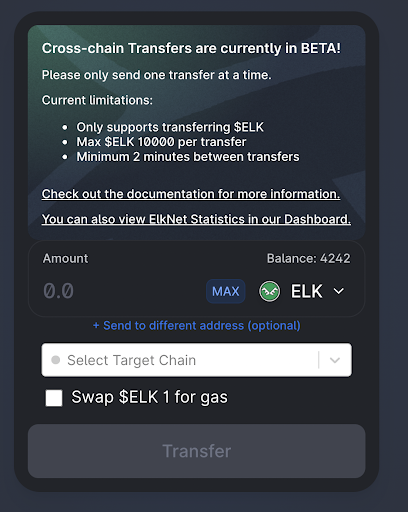
\[Note: you can watch the progress of your transfer by scrolling down to the ElkNet transaction history. Transfers advance from “Initiating” to “Processing” to “Complete.” When the transfer is complete, connect your wallet to the destination chain and refresh the Elk dApp to see your ELK.]
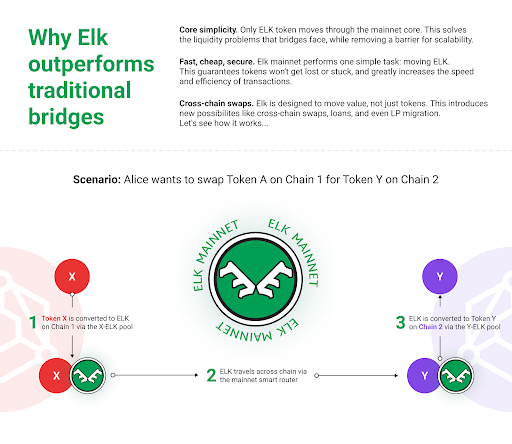
### **Further Information**
**Website -** [**https://elk.finance**](https://elk.finance)\
**Twitter -** [**https://twitter.com/elk\_finance/**](https://twitter.com/elk_finance/)\
**Discord -** [**https://discord.gg/D68vrXgXXZ**](https://discord.gg/D68vrXgXXZ)\
**Telegram -**[ ](https://t.me/elk_finance_chat)[**https://t.me/+iCQGAtXlO\_1mYTU8**](https://t.me/+iCQGAtXlO_1mYTU8)\
**Documentation -** [**https://docs.elk.finance**](https://docs.elk.finance?utm_source=docs\&utm_medium=walkthrough\&utm_campaign=partner_docs\&utm_id=Partner)
# Links
🖥 **Glide Finance App -**
**📰 Medium (Our Blog) -**
**🐦 Twitter -**
:wave: **Discord -**
**💬 Telegram -**
🖥 **GitHub -**
📈 **Glide Analytics -**
🗳️ **Governance -**
# Troubleshooting
## General Troubleshooting
1. When in doubt, refresh. Hard refresh by clearing cache and then refreshing.
2. Networking can be spotty on mobile devices. Make sure you're connected to wifi. Switch from mobile to desktop if necessary.
3. Switch browser, Glide works best on Chrome and Brave.
4. Make sure you're connected to ESC on your wallet. For bridging, make sure you're connected to the chain/network you want to bridge from.
Come to our [Telegram Community](https://t.me/glide_finance) for more help!
###
## Elastos Blockchain Issues
{% hint style="info" %}
Having issues connecting or transacting on Elastos? You're not alone--check out some common issues and resolutions below.
{% endhint %}
**Tips on improving your experience:**
* 🖇 Check your RPC endpoint is working. They can be congested at times.
* ⛽ Watch the gas prices.
* ⚠ Do not keep trying new transactions! Cancel or speed up the existing one.
### RPC Endpoint Issues
* If websites are loading but you are unable to load blockchain data, your RPC endpoint could be congested.
* Check your Metamask token balances: if they are missing, this is a sign that your RPC endpoint is not working.
* [Instructions on using different RPC endpoints](/resources/rpc-endpoints).
### Gas Issues
* If a transaction is not being confirmed (mined), you probably need to **speed up the transaction by paying a higher gas price**.
* Do not keep trying new transactions (see below)!
### Stuck/Pending Transactions
* Cancel the old ones first, or speed it up. [How to speed up or cancel transactions in Metamask](https://metamask.zendesk.com/hc/en-us/articles/360015489251-How-to-speed-up-or-cancel-a-pending-transaction).
* Do not keep queuing up transactions: it will not help as it's a FIFO (First In First Out) queue.
## Other Weird Browser Behavior
* In your browser settings, clear the site's cache.
* In your browser settings, clear the site's cookies.
* Ensure there are no pending transactions.
* Restart the browser.
* Try re-accessing the page.
In rare instances, it has been reported that backing up your private keys, and resetting the Metamask profile data or re-installing Metamask, has resolved some issues.
## Site Connection Issues
{% hint style="info" %}
At rare times, the Glide website may become unresponsive or offline, due to **DDoS (Distributed Denial of Service) attacks**.
{% endhint %}
Unfortunately, DDoS attacks are a common occurrence in the DeFi world. They are staged by bad actors who would wish to take us offline for their benefit.
Fear not--if our primary site [glidefinance.io](https://glidefinance.io) is offline, please try one of our backup sites:
* [S](https://ddos.polycat.finance)oon
{% hint style="info" %}
DDoS attacks are generally transitory and temporary, ceasing within a few hours.
{% endhint %}
## Further Support
{% hint style="info" %}
If you need further assistance, join us on [Telegram](https://t.me/glide_finance). You can find updated links on our [website](https://glidefinance.io).
{% endhint %}
For any other issues not covered in this guide, there are helpful people on Telegram who may be able to assist you.
Note that Glide moderators, developers and administrators will **never directly message you first. I**f you get messages from people purporting to be Glide staff, **they are scammers**!
##
##
# RPC Endpoints
Use these settings to connect to the Elastos Smart Chain network.
**If you are experiencing erratic site loading, transaction delays/failures, or other unexpected behaviour, you may be experiencing an RPC issue.** In order to improve your experience, you can switch to another RPC server.
For Metamask this can be done by navigating to:
```
Settings > Networks > (Your Elastos Network)
```
From there, update the *New RPC URL* value.
{% hint style="info" %}
Note: switching RPC endpoints does not impact your wallet's funds. They are safe and untouched.
{% endhint %}
Alternative RPC servers:
* (located in US)
* (located in US)
* (located in Asia)
* (located in Asia)
**The Chain ID is always 20.** Do not change this, or any of the other settings.
You may edit the existing Elastos network connection, or add a new network such as "Elastos 2". After updating the RPC address, confirm whether you are able to connect to Elastos and that your balance(s) display correctly.
# FAQ
Frequently Asked Questions
## How do I farm?
Farming requires providing liquidity to one of the pools which you can find on the "Farm" page.
You can farm your liquidity pool (LP) tokens on the [Farm](https://spookyswap.finance/farms) page listed below, approving the contract, and choosing the amount you want to farm. See the[ farms]() page for more details.
### How can I join the Sugar Pools?
You can join any of the pools by swapping for GLIDE or harvesting GLIDE from farms and rewards.
### What is the max supply of GLIDE?
GLIDE maximum supply is 50 million, distributed over a 10 year period.
### How do I connect my wallet to Glide?
Navigate to the side bar and click on the "Connect Wallet" button. Then select the wallet you want to connect to Glide in the modal. Approve the connection and your wallet will be connected.
### How do I set up my wallet on Elastos?
For MetaMask users, rather than manually adding a custom RPC, Glide will automatically create network settings for your MetaMask wallet. No setup is required. If you wish to add it yourself anyways, see the [RPC Endpoints](/resources/rpc-endpoints) section for settings. For Elastos Essentials users, simply check that your wallet it set to Elastos under 'Networks'.
### My funds are stuck on the bridge?
There could be many reasons why the bridge is not going through. Don't panic, your funds are safe, but we may need to contract the bridge team and have them re-trigger the transaction. If this happens to you, please contact us on [Telegram](https://t.me/glide_finance) and provide your bridge transaction id.
### How do I fix pending transactions on Metamask?
If hitting "cancel" in the "Activities" tap isn't working, you can try the below option. It basically overwrites the previous one with another buy using the same "nonce", which is like a file name:\
\
1\. On Metamask, click on the circle icon on the top right, and go to **Settings > Advanced**\
\
2\. Scroll down to find **"Advanced gas control"** and "**Customize transaction nonce"**. and make sure they are **both ON**
3\. Back in the main interface, **find your target "pending" transaction** in the "Activities". **Take note of the "Nonce" number**, we'll use this later to find the transaction again.
4\. **Make a new transaction to replace it**, but this time with **increased Gas Price** to raise the probability of the transaction going through.
5\. On the confirmation step, put in the **Nonce number that you took good notes of in step 3,** and hit Confirm
6\. Your new transaction should be queued in the activities
### Why does it say I have no ELA balance?
You're most likely not connected to the Elastos Smart Chain within your wallet.
# Contact us
For business inquiries, please drop us a message at
# 介绍

Glide Finance 是一个在亦来云智能链 (ESC) 上运行的去中心化交易/自动化做市商、收益农业和 Staking 平台,旨在通过充当用户和建立在其上的项目的流动性来源来加速亦来云生态系统的采用.
我们投资于使用我们的 GLIDE 代币作为治理代币、多样化的农场、内置桥梁以及更多功能建立强大的基础。
## 主要特点
#### **↔️** 贸易
该交易所是一组基于 Uniswap V2 的智能合约,允许交换两个代币的任意组合。
#### :ocean: **供应流动性**
将您的资产存入流动性池以赚取交易费并支持亦来云生态系统的发展。
**💸 农场**
赚取 GLIDE 代币以进行流动性挖掘和抵押,或通过将 GLIDE 提供给与其他建立在亦来云上的项目的特殊合作伙伴池来赚取其他代币。
## 🤔 为什么 亦来云?
亦来云是一个多链生态系统,以极低的交易费用提供安全、快速的交易。亦来云智能链是亦来云智能网络中包含的众多组件之一,亦来云智能网络是一个完全去中心化的互联网,用户是自己身份和数据的所有者。
我们选择作为亦来云的先行者来支持生态系统的发展,并包括将去中心化金融 (DeFi) 技术与去中心化标识符 (DID) 相结合的新功能。
# 发布详情
公平推出。没有预售。没有预挖。

### 网站重启
网站将于世界标准时间 11 月 1 日星期一下午 6 点左右升级。在这个阶段,用户将能够将以太坊和 Heco 的资金桥接到 ESC,提供流动性,并将他们的 LP 代币抵押在农场中。。
{% hint style="info" %}
在开始耕种之前,您可以将代币存入任何农场或水池,但在开始区块之前不会有任何奖励。
{% endhint %}
**不用着急!**我们希望所有希望在 $GLIDE 农业开始时参与的人都能够这样做,而不会因为他们在特定时间很忙而错过。从网站启动到产生 $GLIDE 的第一个区块之间将有 2 天的时间。有关如何将资产转移到 ESC 的说明,请参阅农场详细信息部分以了解启动时可用的流动性对和桥接部分。
{% content-ref url="/pages/-MlC3AJf11F3e2sQk1xs" %}
[农场详情](/chinese/products/farm-details)
{% endcontent-ref %}
{% content-ref url="/pages/-Mb8kYm5szh9\_lznvpsj" %}
[桥](/chinese/products/bridge)
{% endcontent-ref %}
### 耕作开始
* 农业开始块: #9255555
* 预计时间: 18:00 UTC 11 月 3 日
网站上将提供倒计时,供用户监控耕作的开始。
{% hint style="info" %}
开发团队将铸造 1 $GLIDE 来创建流动性池。**在农业开始之前,$ GLIDE 的流动性将接近于零!不要试图购买任何!**
{% endhint %}
{% hint style="danger" %}
零预挖 DEX 代币的最初几天和几小时非常不稳定!**我们建议不要在供应量仍然很低的情况下购买 $GLIDE 代币,因为价格很容易被操纵。**
{% endhint %}
# 路线图
Glide Finance 的路线图。这些目标不是确定的,可能会改变。
### 第一阶段:初始发布 🚀
此阶段的全部内容是在亦来云智能链 (ESC) 上将第一个可用的 DEX 呈现在用户面前。在这个阶段,我们不会为 DeFi 带来任何特别新的东西,而是将经过良好测试且安全的智能合约逻辑用于 ESC 作为基础工具。
* [x] 设计代币经济学
* [x] 与亦来云核心团队合作进行必要的基础设施升级
* [x] 桥梁支持和费用补贴
* [x] Essentials 一体化
* [x] 块浏览器错误修复
* [x] 设计 AMM
* [x] 创建 LP 农场和 Staking 结构
* [x] 审计
* [x] 强调 UI/UX
* [x] 干净的界面
* [x] 坚实的品牌
* [x] 桌面和移动响应能力
* [x] 内置跨链桥接
* [x] 电调第一次使用的燃气龙头
* [x] 寻求CR的支持以提供流动性基础
* [x] 释放 Glide 超级节点以提高 Staking 奖励
我们要感谢亦来云基金会为帮助实现这一目标而提供的财政支持。
### 第二阶段:基础工作 🛠
一旦我们建立了这个基础,我们就可以将重点放在构建 Glide 的未来和扩大 ESC 的活动上。
* [x] 分析页面
* [x] Glide RPC 节点
* [ ] 前端的替代托管(IPFS 备份或其他方式)
* [ ] 探索与跨链流动性协议的合作伙伴关系,以增加对亦来云的支持并扩展我们的可桥接网络列表
* [x] 与其他亦来云团队合作以支持新代币
* [ ] 生态系统 NFT 持有者奖励(如果适用)
* [ ] 跨链资产清单扩容及流动性激励方案
* [ ] 电子货币稳定币资产整合
* [ ] 初始农场产品(如果适用)
* [ ] 合作代币奖励(如适用)
* [ ] 去中心化自治组织(DAO)
* [ ] 协议投票
### 第三阶段:探索性特征 :sunrise\_over\_mountains:
* [ ] NFT 与 DeFi 的集成
* [ ] ELA 的跨链流动性激励
* [ ] 流动的 DPoS 投票。允许 ELA 持有者在主链上投票,同时在 ESC 上获得奖励
* [ ] DID 认证激励措施
* [ ] 在亦来云上使用合作伙伴 web3 产品的激励措施
* [ ] 探索 $GLIDE 的长期销毁机制
# 钱包
要使用 Glide,您需要 Elastos Essentials ([在这里下载](https://elastos.academy/elastos-essentials-wallet-for-beginners/)), 连接亦来云智能链的 MetaMask 钱包,或支持添加自定义网络的多链钱包(如 TokenPocket)。
**Elastos Essentials(下图)是生态系统的移动超级钱包** 并包括去中心化标识符 (DID) 支持和跨链功能等重要特性,用于将 ELA 从亦来云主链移动到亦来云智能链。**我们向希望在移动设备上与 Glide 交互的用户推荐 Essentials。**
**对于桌面用户或有去中心化金融应用经验的用户,推荐使用 MetaMask。**MetaMask 默认只支持以太坊网络。但是,当您将 MetaMask 连接到 Glide 时,它会自动配置 MetaMask 以与亦来云智能链一起使用。要手动添加,请使用以下网络设置:
* 网络名称: Elastos
* RPC 网址:
* 链号: 20
* 象征: ELA
* 探险家 网址: [https://esc.elastos.io](https://esc.elastos.io/)
您也可以点击添加到 [https://chainlist.org/](https://chainlist.org)(标记为 ELA-ETH 侧链)。\
\
要在 Glide 或任何其他亦来云 dApp 上执行交易,您需要使用 ELA 来获取 gas。看 [这里](/chinese/getting-started/esc) 有关如何获取天然气的指南。
# 如何将 ELA 加入亦来云智能链 (ESC)
### 从中心化交易所提取ELA
收购 ELA 的主要交易所是 Huobi 和 Kucoin。请注意,这些交易所提供的 ELA 是主链 ELA。首先将 ELA 从 CEX 提取到您在 Elastos Essentials 中找到的主链地址。从那里,将您的 ELA 转移到 ESC(有关说明,请参阅下一节)。
*警告:Heco 有自己的 ELA 包装版本,称为 HELA。您不能将 ELA 提取到 Heco,然后桥接到 ESC。它必须经过主链。同理,请勿将电汇桥接Heco的ELA存入火币。不起作用。*
### 将 ELA 从亦来云主链转移到 ESC
由于亦来云的主侧链结构,用户需要先将ELA提取到主链(使用亦来云Essentials等钱包),然后将ELA转移到亦来云智能链(ESC)。有关如何在主链和 ESC 之间移动,请参阅此简短的视觉指南。

### 将 ELA 从其他链桥接到亦来云智能链 (ESC)
ELA 也可作为 Uniswap(以太坊网络)上的包装版本使用。如果您在那里购买 ELA,您可以使用 Glide's Bridge 将其桥接到 ESC。但是,为了节省 gas 费用,我们建议用户先将 ETH 桥接到 ESC,然后在 Glide 上换成 ELA。
{% content-ref url="/pages/-Mb8kYm5szh9\_lznvpsj" %}
[桥](/chinese/products/bridge)
{% endcontent-ref %}
### 在 Glide 上兑换 ELA
一旦您在 ESC 上拥有我们支持的任何资产(请参阅 [桥 ](/chinese/products/bridge)for the list), 您可以使用 [Glide's 交换页](/chinese/products/swap). 您只需要在 ELA 中添加一些 gas 即可完成此操作
{% content-ref url="/pages/-MZnXW0vPJlgfqdE5Kmi" %}
[交换](/chinese/products/swap)
{% endcontent-ref %}
**我没有ELA气!帮助!**不要担心。源自以太坊和 Heco 网络的所有桥接交易都会自动向用户提供少量 gas。
{% content-ref url="/pages/-Ml6FYqykcAkWWcg92Hp" %}
[龙头](/chinese/products/faucet)
{% endcontent-ref %}
####
# 交换
Glide Finance AMM(自动做市商)
Glide 上的代币交换(基于 Uniswap V2)是一种通过自动流动性池将一种代币交易为另一种代币的简单方法。 Glide 上资产的交易价格与中心化交易所等外部来源之间的偏差为交易者创造了套利机会,并使资产价格能够跟踪整个市场的平均水平。
### 交易费
当您在交易所掉期(交易)时,您将支付0.25%的交易费用,其中0.05%返还到流动性池作为对流动性提供者的奖励,0.2%转换为ELA并通过股息池与GLIDE[持有者共享](https://docs.glidefinance.io/chinese/products/pages/-MZnehGveDoUW6t-o7tb#3.-dividend-pool). 这笔费用不会进入国库或开发商基金。
## 如何交换
要求
* 连接钱包(MetaMask、Elastos Essentials 或其他支持自定义网络的钱包
* 一些用于气体的 ELA
脚步
1. 首先通过单击左上角的连接钱包按钮使用您的 MetaMask 钱包连接到亦来云。 MetaMask 会征求您的许可来切换网络。
2. 转到“交换”
3. 通过单击“发件人”令牌选择您要从中交换的令牌,将弹出一个窗口以选择带有您的余额的令牌
4. 如果您要查找的令牌不在我们的默认列表中,您可以通过在搜索框中输入其地址来添加它,然后将出现一个将其添加到列表的选项
5. 选择“发件人”令牌后,以相同的方式选择“收件人”令牌
6. 如果您尚未批准令牌,系统将提示您批准它们。单击“批准”按钮,您的钱包将要求您确认批准。这可能需要几秒钟的时间在网络中进行批准。
7. 一旦“Swap”出现启用,您可以单击“swap”,您的钱包会询问您的许可。
8. 当您的交换请求已添加到链的内存池时,您将看到“交易已提交”屏幕。要查看进度,您可以单击“在资源管理器上查看”,或查看钱包中的活动链接
您现在已经在 Glide 上完成了第一次交换!

# 流动性
## 概述
增加流动性允许贡献者从他们提供的货币对中赚取 0.05% 的掉期费。您可以通过以下方式提供流动性并开始赚取费用 [在这里增加流动性](https://glidefinance.io/add). 如果在农场下注,您的流动性可以获得更多奖励(GLIDE)!\
\
当您提供流动性时,您将收到 Glide-LP 代币(Glide Liquidity Provider 代币)作为贡献证明。例如,如果用户将 $GLIDE 和 $ELA 存入池中,他们将收到 GLIDE-ELA LP 代币。这些代币代表汇集资产的比例份额。\
\
这些 LP 代币可以在农场抵押以获得 GLIDE。我们有 6 对供您开始质押,并计划随着 ESC 上提供更多资产而随着时间的推移扩大名单。
### 矿池如何从费用中产生价值
如果在交易时,有 100 个 Glide-LP 代币代表 100 个 ELA 和 100 个 GLIDE,则每个 LP 代币价值 1 个 ELA 和 1 个 GLIDE。\
\
如果一个用户用 10 ELA 交易 10 GLIDE,另一个用户用 10 GLIDE 交易 10 ELA,那么现在池中将有 100.005 GLIDE 和 100.005 ELA。\
\
这意味着每个 LP 代币在提取时价值 1.00005 GLIDE 和 1.00005 ELA。
### 为现有池增加流动性
您需要以 1:1 的价值比率向流动性池提供代币。这意味着,如果您要添加到 GLIDE-ELA 池中,并希望提供价值 1000 ELA 的流动性,您需要首先使用交换工具将大约 500 ELA 转换为等值的 GLIDE 代币。
### 向新池添加流动性
如果您希望为其提供流动性的池不存在,您可以自己创建。只需提供令牌即可。作为第一个流动性提供者,如果 Glide 上不存在货币对中的一个代币,您设置初始兑换比率(价格)。这通常会通过套利和更多流动性提供者添加到池中来迅速纠正。
## 无常损失
非永久性损失(称为 IL)是您作为流动性提供者承担的风险之一,是 AMM 运作方式的结果。这里有两篇文章可以更好地解释它:\
\
[了解 Uniswap 回报](https://pintail.medium.com/understanding-uniswap-returns-cc593f3499ef)\
[无常损失初学者指南](https://blog.bancor.network/beginners-guide-to-getting-rekt-by-impermanent-loss-7c9510cb2f22)
他们会让您了解什么是 IL 以及您如何受到它的影响。
TL;DR:如果您在那个确切的时刻退出(因此术语无常),与持有代币本身相比,池中两个代币的相对价格差异的大幅波动可能会导致损失。如果您完全撤回流动性,损失只是“永久性的”,但这并不意味着 IL 一定会随着时间的推移而消失。一般来说,作为流动性提供者收取的交易费用和农场的收益可以抵消IL风险,但没有任何保证。
# 流动性农业
在抵押 LP 代币的同时赚取 $GLIDE
农场是放置您的 Glide-LP(Glide 流动性对代币)以赚取 GLIDE 的地方。这些农场为向 Glide 提供流动性的人提供激励,并帮助抵消非永久性损失风险。
### 启动时的农场
为保证流动性深度充足,我们将在启动时仅支持以下农场。但是,随着新资产和链与亦来云生态系统连接以及整体流动性的增长,该列表将随着时间的推移而演变。最终获得 GLIDE 奖励的配对将由社区治理决定。
* GLIDE-ELA
* USDC-ELA
* ETH-ELA
* HUSD-USDC
* HT-ELA
* FILDA-ELA
请参[阅场详细信](/chinese/products/farm-details)息以了解每对的分配。
{% content-ref url="/pages/-MlC3AJf11F3e2sQk1xs" %}
[农场详情](/chinese/products/farm-details)
{% endcontent-ref %}
这些代币在另一条链上吗?您可以按照本指南使用 Glide 将它们桥接到 ESC。
{% content-ref url="/pages/-Mb8kYm5szh9\_lznvpsj" %}
[桥](/chinese/products/bridge)
{% endcontent-ref %}
###
### 如何抵押流动性
如果您已向可用于奖励的流动性池提供流动性(如果没有,请参阅发布时的农场部分),那么现在是赚取一些 GLIDE 的时候了!这真的很容易做到。
1. 首先找到您想要交易的货币对,并在流动性页面上为该货币对制作 Glide-LP。
2. 如果这是您第一次在 Glide 上的这个池中进行质押,则您需要获得钱包的批准才能开始该过程。点击“启用”。这将提示交易以批准我们为该特定池处理您的 Glide-LP 代币的智能合约。
3. 完成后,单击“+”图标。
4. 您将看到一个模式,您可以在其中指定您希望抵押的 Glide-LP 代币数量
5. 一旦您做出决定,点击“确认”将提示您进行在我们的智能合约中抵押代币所需的交易。\
\
就是这样!现在您所要做的就是在赚取 GLIDE 的同时坐下来放松一下。
###
### 流动性农场常见问题解答
**抵押/存款会收取任何费用吗?**\
不,这里的赌注是免费的。
**APR是真的吗?!**\
是的,但是随着更多流动性加入池中,预计 APR 会随着您在池中份额的减少而自然下降。
**我将获得什么?**\
通过将您的流动性代币放在农场中,您将:\
\
1\. 每当有人在您提供的货币对之间进行交换时收取交换费用。您的 Glide-LP 代币数量不会增加,但它们代表的价值会增加。\
2\. 根据农场重量赚取 GLIDE。由于 Glide DEX 费用结构的安排方式,这将构成您收入的大部分。\
\
**我找不到我的那双,它藏在哪里?**\
你的配对没有出现可能有几个原因:\
\
1\. 检查您的钱包是否已连接,并已连接到亦来云网络\
2\. 如果您在已弃用的场中提供 LP,则该对将显示在“非活动”选项卡中,您可以通过单击左上角的选项卡切换到该选项卡。进入非活动农场页面后,您需要再次连接您的钱包以查看您的配对是否在那里。\
3\. 您的 LP 合同可能仍在确认中,您可以查看 [电调浏览器 ](https://esc.elastos.io)对于状态\
4\. 如果您的 LP 被抵押在一个农场中,它将不会显示在交换页面的“流动性”选项卡中
# 农场详情
分配给每个流动性对的相对 GLIDE 分布
### 农场重量
| **令牌对** | **重量** | **滑翔/天** |
| ---------- | ------ | -------- |
| GLIDE-ELA | 12x | 6190 |
| USDC-ELA | 10x | 5157 |
| ETH-ELA | 8x | 4126 |
| HUSD-USDC | 6x | 3094 |
| HT-ELA | 5x | 2578 |
| FILDA-ELA | 4x | 2063 |
| GLIDE-USDC | 4x | 2063 |
###
### 这些代币来自哪里?
| 令牌 | 令牌 |
|---|
| 令牌 | 令牌 |
| GLIDE | Elastos Smart Chain |
| ELA | Elastos Mainchain |
| ETH | Ethereum |
| USDC | Ethereum |
| HT | Heco |
| HUSD | Heco |
| FILDA | Heco |

# 单股权池
抵押您的 GLIDE 并获得奖励!
**Glide's Pools 是开始赚取奖励的最简单方法之一:**
* 赌注。
* 利润。
* 重复!
无需处理无常的损失,出售一半的奖励或配对。发布时将提供三个核心质押选项:
### 1. 手动滑翔
手动 GLIDE 是您典型的抵押池。用户可以选择自己收获或合成他们获得的 GLIDE。
### 2. 自动滑行
Auto GLIDE 是用于 GLIDE 放样的自动复合金库。这为用户提供了设置和忘记的选项。简单地抵押您的 GLIDE 并知道它会自动为您复合。请注意,这个池有一些额外的参数:
* 如果用户决定在 7 天前取消其 GLIDE 的抵押,则将收取 1% 的费用。 7天后,没有取消费用
* 每次您在金库中放置新的 GLIDE 时,7 天计时器都会重置
* 将收取 2% 的绩效费,该费用将被存入国库,然后被销毁
* 用户可以获得赏金奖励,以帮助增加池。他们将获得 0.25% 的待定 GLIDE 收益来激活该功能
### 3. 分红池
这是一个由多种机制资助的特殊池:
1. 在 Glide DEX 上进行的每笔交易都需要缴纳 0.25% 的交易费,其中 **0.2% 会转换为 ELA** 并存入该池中。
2. Glide 超级节点会将其收入的 100% 存入这里。在主链上为 Glide 投票,在 Glide DEX 上获得更多 ELA 奖励!
3. 未来的合作伙伴计划和激励措施计划为这个池注入更多 ELA。
请注意,由于可用于返回 Glide 平台用户的 ELA 数量的变化,该池的 ELA 分配率可能会经常变化。

### 糖代币
您可能已经注意到,当您将 GLIDE 投入手动或自动 GLIDE 池时,您将收到一个“糖”代币(因为我们的吉祥物当然是糖滑翔机!)。此代币用于记录您的抵押头寸。**请勿转让、出售或销毁此代币。您将需要它来兑换您的 GLIDE。**
# 桥
如何桥接
为了向非本地 ESC 农场提供流动性,您需要先将资产从其他链交换或转移到 ESC。这个过程称为桥接。
Glide 的桥使用与以下相同的底层合约 [Shadowtokens](https://tokbridge.net). 它目前支持将一组有限的资产从 Ethereum 或 Heco 转移到 ESC,以及从 ESC 转移到 Ethereum 或 Heco。桥梁只会列出 Glide DEX 支持的资产。
**ETH - ESC** 桥接支持的令牌:
* ETH
* USDC
* ELA
**Heco - ESC** 桥接支持的令牌:
* HT
* HUSD
* ELA
* FILDA
随着协议与 ESC 一起发展,我们将向列表中添加更多代币以提供支持!
### 过桥费
对于 Heco,代币(HUSD、FILDA)没有过桥费。用户只需要在原链上支付gas,剩下的就交给他们了。对于原生资产 (HT),目前双向(往返 ESC)的过桥费均为 0.1%。
对于以太坊,在桥接到亦来云网络时,除了 gas 成本外,没有其他费用。但是,为了支付回程的油费,将资产从亦来云桥接到以太坊时将收取 1% 的费用。 为了提高gas效率,以太坊桥还包括以下最低转账金额:
* ETH: 1
* USDC: 5000
* ELA: 1000
### **龙头**
还有一个与桥相连的水龙头,保证新的 ESC 用户将有天然气开始交易。见 [水龙头部分](/chinese/products/faucet) 详情。
{% content-ref url="/pages/-Ml6FYqykcAkWWcg92Hp" %}
[龙头](/chinese/products/faucet)
{% endcontent-ref %}
## 如何桥接
### 1. 为桥接方向选择网络
首先,选择您要桥接的网络。其中一个网络必须是亦来云,因为 Glide 桥不支持桥接 ETH -> Heco 或 Heco -> ETH。

### 2. 选择要桥接的令牌
在“选择要桥接的令牌”字段中,选择您要桥接的令牌。

### 3. 输入金额
检查您输入的金额是否在 Shadowtokens 合约支持的最小和最大范围内。在 ESC 上桥接代币或从 ESC 桥接代币不会产生费用!但是,原生资产(即 ETH、HT、ELA)将包含少量费用(通常为 0.1%)。

### 4. 点击“启用”
对于非原生资产(除了 ETH、HT、ELA 之外的所有资产),您需要允许桥接合约使用您的代币。单击启用,然后在 Metamask 中批准交易。
### 5. 点击“桥接令牌”
Metamask 会要求您确认您的操作。与许多其他桥梁不同,源链上只有 1 笔交易需要您确认。目标链事务由桥接中介在内部处理。您将收到与桥接相同的令牌。
桥接过程可能需要几分钟才能传播。 Glide 界面将监控桥接成功 3 分钟,之后它会超时并提醒用户监控他们的交易的区块浏览器。如果您遇到这种情况,请不要害怕!给它 10-20 分钟,如果你的代币仍然没有出现在目标链上,然后检查 [故障排除 ](/chinese/resources/troubleshooting)部分或跳入我们的[ Telegram](https://t.me/glide_finance) 寻求帮助。别担心,您的资金是安全的。
### 6. 查看您的桥接令牌
要检查您是否在桥的另一侧收到了代币,请将您的钱包连接到 ESC,访问 交换页面并查看您的代币余额是否已更新。或者,您可以将令牌地址添加到 Metamask([在这里找到它们](/chinese/addresses/tokens)),或者只是在 的区块浏览器中搜索您的地址。
### 7. 在桥接到亦来云之后?
现在怎么办?如果你期待交易一些代币或农业,就像任何其他链一样,你需要一些 ELA 来获取 gas 来执行交易。幸运的是,您应该已经从桥接过程中获得了一些!如果由于某种原因水龙头出现故障或资金用完,请在 [Telegram](https://t.me/glide_finance) 中留言,有人会帮助您。
# 龙头
Gas 通常是在各种区块链之间移动资产的摩擦点。为了解决这个问题,我们实现了一个简单的燃气龙头,当用户将资产从其他区块链转移到 ESC 时,它会自动触发。目前,drip设置为0.01 ELA,足以在ESC上提交数十笔交易。
目前没有办法在不首先向桥梁提交转移请求的情况下接收水龙头滴水。这就是我们抵御垃圾邮件的方式。水龙头服务会收到请求,验证交易哈希作为合法的桥接交易,然后将滴水释放到用户的地址。
要验证您的交易是否符合水龙头滴漏的条件,您应该在桥页底部看到此通知。提交交易后,如果滴注成功,您将收到通知。
就是这样。如果由于某种原因水龙头出现故障或资金用完,请在[Telegram](https://t.me/glide_finance)群中留言,会有人帮助您。

# GLIDE 令牌
所有的事情 $GLIDE

### 💠 代币信息
* 代币符号: GLIDE
* 合约地址: [`0xd39eC832FF1CaaFAb2729c76dDeac967ABcA8F27`](https://esc.elastos.io/address/0xd39eC832FF1CaaFAb2729c76dDeac967ABcA8F27)
* 链:亦来云智能链 (ESC)
* 最大供应量: 50,000,000
* 农业创世区块: #9255555
* 没有pre-mint或pre-mine。完全公平的发布
### :signal\_strength: 分配
| 分发到 | 分配 | 当前滑翔/方块 | 当前滑翔/天 |
| ------ | ----- | ------- | ------ |
| 流动性和抵押 | 65% | 1.95 | 33,696 |
| 社区金库 | 22.5% | 0.675 | 11,664 |
| 发展 | 12.5% | 0.375 | 6,480 |

### ⛏️ 排放率
* 以 3 GLIDE/区块(5 秒区块时间)开始发行,为期 3 个月的奖励期。红利期结束时,发行量将减少25%
* 奖励期结束后,代币将采用通货紧缩模式,其中 $GLIDE 发行量每 6 个月减少 15%
* 50,000,000 GLIDE 硬顶预计需要 10 年时间才能达到

| 日期 | 滑行/块 | GLIDE 循环供应 |
| ------------------- | ----- | ---------- |
| November 3rd, 2021 | 3.000 | 1 |
| February 3rd, 2022 | 2.250 | 4,730,400 |
| August 3rd, 2022 | 1.913 | 11,826,000 |
| February 3rd,, 2023 | 1.626 | 17,857,260 |
| August 3rd, 2023 | 1.382 | 22,983,831 |
| February 3rd,, 2024 | 1.175 | 27,341,416 |
| August 3rd, 2024 | 0.998 | 31,045,364 |
| February 3rd,, 2025 | 0.849 | 34,193,719 |
| August 3rd, 2025 | 0.721 | 36,869,821 |
| February 3rd,, 2026 | 0.613 | 39,144,508 |
| August 3rd, 2026 | 0.521 | 41,077,992 |
| February 3rd,, 2027 | 0.443 | 42,721,453 |
| August 3rd, 2027 | 0.377 | 44,118,395 |
| February 3rd,, 2028 | 0.320 | 45,305,796 |
| August 3rd, 2028 | 0.272 | 46,315,087 |
| February 3rd,, 2029 | 0.231 | 47,172,984 |
| August 3rd, 2029 | 0.197 | 47,902,196 |
| February 3rd,, 2030 | 0.167 | 48,522,027 |
| August 3rd, 2030 | 0.142 | 49,048,883 |
| February 3rd,, 2031 | 0.121 | 49,496,710 |
| August 3rd, 2031 | 0.103 | 49,877,364 |
| October 12th, 2031 | 0.000 | 50,000,000 |
# 费用结构
## 农场费用
* 0% 提款费用
* 0% 存款费用
* 0% 收获费
### 泳池费用
* 0% 提款费用
* 0% 存款费用
* 0% 收获费
注意:如果用户在 7 天等待期之前提款,Auto GLIDE 矿池可以包含 1% 的提款费。 有关详细信息,请参阅单股权池。
### 掉期费
Glide 的 DEX 上的每笔交易都将收取以下费用:
* 0.05% 给 LP 供应商
* 0.2% 购买 $ELA 并通过红利池分配给 $GLIDE 持有者
总费用:0.25%
未来,我们可能还会将部分 0.2% 的费用分配给新功能,例如 $GLIDE 燃烧池。
# 合同
这是所有官方 Glide 智能合约的列表。请务必在此处查看官方合同地址。
## 代币合约
**GLIDE Token** `0xd39eC832FF1CaaFAb2729c76dDeac967ABcA8F27`
* 此合约地址用于 $GLIDE 代币。将此地址导入您的钱包以开始发送和接收 $GLIDE
**SUGAR Token** `0xa09Fd898D9c14CE6503dDb7A6861Dd08642BF60e`
* 此合约地址用于 $SUGAR 代币。不要与此令牌交互。它用于记录您的抵押头寸。您将需要它来赎回您质押的 $GLIDE。
## 自动做市商 (AMM)
* **Factory** `0xaAbe38153b25f0d4b2bDa620f67059B3a45334e5`
* **Router** `0xec2f2b94465Ee0a7436beB4E38FC8Cf631ECf7DF`
## 抵押合约
**MasterChef** `0x7F5489f77Bb8515DE4e0582B60Eb63A7D9959821`
* **MasterChef** 控制 Glide 农场和手动 GLIDE 池功能。
**GlideVault** 0xBe224bb2EFe1aE7437Ab428557d3054E63033dA9
* **GlideVault** 处理 Auto GLIDE 池的功能,允许用户自动组合他们抵押的 $GLIDE。
## 掉期费合约
**FeeDistributor** `0x87CC7290897cbe50Eb38e0C299B26798f87C8D5F`
* **FeeDistributor** 合约收取交易所掉期费用,将其转换为 ELA,并转移到 **SwapRewardsChef** 合约。它由外部脚本每 6 小时触发一次。
**SwapRewardsChef** `0x80f2cF7059336b44a75F00451B81f8d742DD2b94`
* **SwapRewardsChef** 控制红利池(stake GLIDE,赚取 ELA)功能。开发团队将调整 ELA 分配率,以确保池不会耗尽资金。
## 其他合同
**Timelock** `0x418cf264f8Ac12e75C28CD76072A7ECa44209EFC`
* **Timelock** 可防止对我们的智能合约进行即时更改。
**所有合约代码都是开源的,可以在我们的** [**Github**](https://github.com/glide-finance) **上找到。**
# 代币
## 单一令牌地址
| **合同** | **地址** |
| ------ | ----------------------------------------------------------------------------------------------------------------------- |
| GLIDE | [0xd39eC832FF1CaaFAb2729c76dDeac967ABcA8F27](https://esc.elastos.io/address/0xd39eC832FF1CaaFAb2729c76dDeac967ABcA8F27) |
| SUGAR | [0xa09Fd898D9c14CE6503dDb7A6861Dd08642BF60e](https://esc.elastos.io/address/0xa09Fd898D9c14CE6503dDb7A6861Dd08642BF60e) |
| wELA | [0x517E9e5d46C1EA8aB6f78677d6114Ef47F71f6c4](https://esc.elastos.io/address/0x517E9e5d46C1EA8aB6f78677d6114Ef47F71f6c4) |
| ETH | [0x802c3e839E4fDb10aF583E3E759239ec7703501e](https://esc.elastos.io/address/0x802c3e839E4fDb10aF583E3E759239ec7703501e) |
| USDC | [0xA06be0F5950781cE28D965E5EFc6996e88a8C141](https://esc.elastos.io/address/0xA06be0F5950781cE28D965E5EFc6996e88a8C141) |
| HT | [0xeceefC50f9aAcF0795586Ed90a8b9E24f55Ce3F3](https://esc.elastos.io/address/0xeceefC50f9aAcF0795586Ed90a8b9E24f55Ce3F3) |
| HUSD | [0xF9Ca2eA3b1024c0DB31adB224B407441bECC18BB](https://esc.elastos.io/address/0xF9Ca2eA3b1024c0DB31adB224B407441bECC18BB) |
| FILDA | [0xB9Ae03e3320235D3a8AE537f87FF8529b445B590](https://esc.elastos.io/address/0xB9Ae03e3320235D3a8AE537f87FF8529b445B590) |
## GLIDE LP 对地址
| **一对** | **地址** |
| --------- | ----------------------------------------------------------------------------------------------------------------------- |
| GLIDE-ELA | [0xbeeAAb15628329C2C89Bc9F403d34b31fbCb3085](https://esc.elastos.io/address/0xbeeAAb15628329C2C89Bc9F403d34b31fbCb3085) |
| USDC-ELA | [0x6077b7990d3d0dfB5A50f1D207f67ac5955B999d](https://esc.elastos.io/address/0x6077b7990d3d0dfB5A50f1D207f67ac5955B999d) |
| ETH-ELA | [0xa86883c2405f4557D2242Df47b220C54d0D611e4](https://esc.elastos.io/address/0xa86883c2405f4557D2242Df47b220C54d0D611e4) |
| HUSD-USDC | [0xB0917F2595A2c4C56498f6da2C52690a3EF558D2](https://esc.elastos.io/address/0xB0917F2595A2c4C56498f6da2C52690a3EF558D2) |
| HT-ELA | [0xC6734784EE598855200dABC8D8B1fA1F11f14C90](https://esc.elastos.io/address/0xC6734784EE598855200dABC8D8B1fA1F11f14C90) |
| FILDA-ELA | [0x5B0Cf7D3b2D6885e1173674f4649B914e7A66B96](https://esc.elastos.io/address/0x5B0Cf7D3b2D6885e1173674f4649B914e7A66B96) |
# 其他
外围钱包
| Purpose | Address |
| --------------------------------- | ----------------------------------------------------------------------------------------------------------------------- |
| Development fund | [0xe511F61Ab96818579f995a4Db356caf3e9A00fFf](https://esc.elastos.io/address/0xe511F61Ab96818579f995a4Db356caf3e9A00fFf) |
| Community treasury | [0xFF998bF6F25e6b3dBdFedBecfC02B1e97a4FDb3c](https://esc.elastos.io/address/0xFF998bF6F25e6b3dBdFedBecfC02B1e97a4FDb3c) |
| Master deployment account | [0x3Ac3935326cCA3146365a39458b5905bCdAe476b](https://esc.elastos.io/address/0x3Ac3935326cCA3146365a39458b5905bCdAe476b) |
| Cyber Republic liquidity multisig | 0x0000 |
| Glide Bonds | [0x7DC98d4D52589bCDe73Cd15cFC4411FAA6A1E394](https://esc.elastos.io/address/0x7DC98d4D52589bCDe73Cd15cFC4411FAA6A1E394) |
# 审计
智能合约安全评估

我们已经完成了对 AMM 和 Masterchef 合同的全面审计 从 [**Paladin Blockchain Security.**](https://paladinsec.co/) 完整的审计报告可在下方获取或查看 [这里](https://github.com/glide-finance/audits/blob/master/Paladin_Glide_Finance_Final_Report.pdf). 所有确定的问题都已得到确认或解决。
{% file src="/files/-MlI5TEdIJKB-mW0sC1u" %}
Paladin Audit
{% endfile %}
本次审计的一个澄清点。
* 由于 Glide 代币的发行期为 10 年,因此我们希望为可能的情况做好准备,即我们希望在未来某个时候将我们的抵押合约升级为更现代的迭代。大多数基于 Sushiswap 的协议的工作方式是 Masterchef 合约成为奖励代币合约的所有者,这是无法更改的。这在投资者信心方面有一些优势,但缺点是推出后无法改善。因此,我们决定在我们的 Masterchef 合约中加入一个功能,允许我们转移 Glide 代币的所有权。 DeFi 领域发展迅速,我们希望确保 Glide 能够适应不断发展的标准。因此,我们的 Masterchef 合约将被置于 7 天的时间锁定之后,以确保用户有足够的时间来应对 Glide 代币所有权是否被恶意转让。
# 其他措施
您的信任和安心对我们至关重要:Glide 在构建时就考虑到了安全性。
Glide 被设计为可证明安全的——请随时验证我们的 [源代码](https://github.com/glide-finance)[.](https://github.com/glide-finance) 我们删除了经常被滥用的迁移器代码并添加了时间锁,以实现完全透明和安全。
**迁移器功能已被删除。**
* Migrator 经常被恶意开发者/黑客用来窃取用户的资金。
* 这在 Glide 上是不可能的,因为迁移功能已从我们的代码中完全删除。
**时间锁**
* 时间锁可防止对 Glide 智能合约进行任何不可见和即时的更改。更改会被锁定一段时间,并且可以公开监控,提醒用户任何更改。
* 没有时间锁,恶意方可以立即修改智能合约,不会给用户任何警告。
* 我们的时间锁定延迟为 7 天。
{% hint style="info" %}
如果更改在时间锁中排队并且您不同意,那么您有一段时间提取资金并在更改被推送之前通知其他人。
{% endhint %}
# 链接
🖥 **Glide Finance App -**
**📰 Medium (Our Blog) -**
**🐦 Twitter -**
:wave: **Discord -**
**💬 Telegram -**
🖥 **GitHub -**
📈 **Glide Analytics -**
🗳️ **Governance -**
# 故障排除
## 一般故障排除
1. 如有疑问,请刷新。通过清除缓存然后刷新来硬刷新。
2. 网络在移动设备上可能不稳定。确保您已连接到 wifi。如有必要,从移动设备切换到桌面设备。
3. 切换浏览器,Glide 在 Chrome 和 Brave 上效果最好。
4. 确保您已连接到钱包上的 ESC。对于桥接,请确保您已连接到要从中进行桥接的链/网络。
来我们的 [Telegram](https://t.me/glide_finance) 社区寻求更多帮助!
###
## 亦来云区块链问题
{% hint style="info" %}
在亦来云连接或交易时遇到问题?您并不孤单——请查看下面的一些常见问题和解决方案。
{% endhint %}
**改善体验的提示:**
* 🖇 检查您的 RPC 端点是否正常工作。他们有时会很拥挤。
* ⛽ 关注汽油价格。
* ⚠ 不要继续尝试新的交易!取消或加速现有的。
### RPC 端点问题
* 如果网站正在加载但您无法加载区块链数据,则您的 RPC 端点可能会拥塞。
* 检查您的 Metamask 令牌余额:如果它们丢失,则表明您的 RPC 端点不工作。
* [有关使用不同 RPC 端点的说明。](#rpc-endpoint-issues)
### 气体问题
* 如果交易未被确认(挖掘),您可能需要通过支付更高的gas价格来加速交易。
* 不要继续尝试新的交易(见下文)!
### 卡住/待处理事务
* 先取消旧的,或者加快速度。[如何在 Metamask 中加速或取消交易。](https://metamask.zendesk.com/hc/en-us/articles/360015489251-How-to-speed-up-or-cancel-a-pending-transaction)
* 不要继续排队交易:它没有帮助,因为它是一个 FIFO(先进先出)队列
## 其他奇怪的浏览器行为
* 在浏览器设置中,清除站点的缓存。
* 在您的浏览器设置中,清除站点的 cookie。
* 确保没有待处理的交易。
* 重新启动浏览器。
* 尝试重新访问该页面。
在极少数情况下,据报道备份您的私钥、重置 Metamask 配置文件数据或重新安装 Metamask 已解决了一些问题。
## 站点连接问题
{% hint style="info" %}
**在极少数情况下,由于 DDoS(分布式拒绝服务)攻击,Glide 网站可能会变得无响应或离线。**
{% endhint %}
不幸的是,DDoS 攻击在 DeFi 世界中屡见不鲜。他们是由坏演员上演的,他们希望为了他们的利益而让我们离线。
不要害怕——如果我们的主站点 [glidefinance.io](https://glidefinance.io) 离线,请尝试我们的备份站点之一:
* 很快
{% hint style="info" %}
DDoS 攻击通常是暂时的,会在几个小时内停止。
{% endhint %}
## 进一步支持
{% hint style="info" %}
如果您需要进一步的帮助,请加入我们的 [Telegram](https://glidefinance.io)。您可以在我们的网站上找到更新的链接。
{% endhint %}
对于本指南中未涵盖的任何其他问题,Telegram 上有一些乐于助人的人可以为您提供帮助。
请注意,Glide 版主、开发者和管理员永远不会先直接给您发送消息。如果您收到自称是 Glide 员工的消息,他们就是骗子!
##
##
# RPC 端点
使用这些设置连接到亦来云智能链网络。
**如果您遇到不稳定的站点加载、事务延迟/失败或其他意外行为,您可能遇到了 RPC 问题。**为了改善您的体验,您可以切换到另一个 RPC 服务器。
对于 Metamask,这可以通过导航到:
```
Settings > Networks > (Your Elastos Network)
```
从那里,更新新的 RPC URL 值。
{% hint style="info" %}
注意:切换 RPC 端点不会影响您钱包的资金。他们是安全的,没有受到影响。
{% endhint %}
替代 RPC 服务器:
* (位于美国)
* (位于美国)
* (位于亚洲)
* (位于亚洲)
**链 ID 始终为 20。**请勿更改此设置或任何其他设置。
您可以编辑现有的亦来云网络连接,或添加新网络,例如“亦来云 2”。更新 RPC 地址后,请确认您是否能够连接到亦来云以及您的余额是否正确显示。
# 常问问题
经常问的问题
## 我如何耕种?
农业需要为您可以在“农场”页面上找到的池之一提供流动性。
您可以在下面列出的农场页面上种植流动性池 (LP) 代币,批准合同,并选择您想要种植的数量。有关更多详细信息,请参阅农场页面。
### 我怎样才能加入糖池?
您可以通过交换 GLIDE 或从农场和奖励中收获 GLIDE 来加入任何池。
### GLIDE 的最大供应量是多少?
GLIDE 的最大供应量为 5000 万,分发时间为 10 年。
### 如何将我的钱包连接到 Glide?
导航到侧栏并单击“连接钱包”按钮。然后在模态中选择您要连接到 Glide 的钱包。批准连接,您的钱包将被连接。
### 如何在亦来云上设置我的钱包?
对于 MetaMask 用户,Glide 不会手动添加自定义 RPC,而是会自动为您的 MetaMask 钱包创建网络设置。无需设置。如果您想自己添加它,请参阅[ RPC](/chinese/resources/rpc-endpoints) 端点部分的设置。对于亦来云 Essentials 用户,只需在“网络”下检查您的钱包是否设置为亦来云。
### 我的资金卡在桥上?
这座桥没有通过可能有很多原因。不要惊慌,您的资金是安全的,但我们可能需要与桥接团队签约并让他们重新触发交易。如果您遇到这种情况,请通过 [Telegram](https://t.me/glide_finance) 与我们联系并提供您的桥接交易 ID。
### 如何修复 Metamask 上的待处理交易?
如果在“活动”点击中点击“取消”不起作用,您可以尝试以下选项。它基本上使用相同的“nonce”用另一个购买覆盖了前一个,就像一个文件名:\
\
1\. 在 Metamask 上,单击右上角的圆圈图标,然后转到设置 > 高级\
\
2\. 向下滚动找到“Advanced gas control”和“Customize transaction nonce”。并确保它们都打开
3\. 返回主界面,在“活动”中找到您的目标“待处理”交易。记下“Nonce”编号,稍后我们将使用它来再次查找交易。
4\. 进行新的交易来替换它,但这次增加 Gas Price 以提高交易通过的可能性。
5\. 在确认步骤中,输入您在步骤 3 中记下的 Nonce 编号,然后点击确认
6\. 您的新交易应该在活动中排队
### 为什么它说我没有 ELA 余额?
您很可能没有连接到钱包内的亦来云智能链。
# 联系我们
如需业务咨询,请给我们留言: